Formula 1 meets Home Assistant
Your home.
On race time.
The race weekend, brought home. Schedules, live timing, one configurable dashboard card and automations that follow the action.
Start with public live timing. F1TV Auth is optional.
From the track to your room
Yellow flag.
Yellow light.
When the flags change, your room follows. Turn track status into lighting with Home Assistant, and use Live Delay to match the moment on your TV.
Set up flag lighting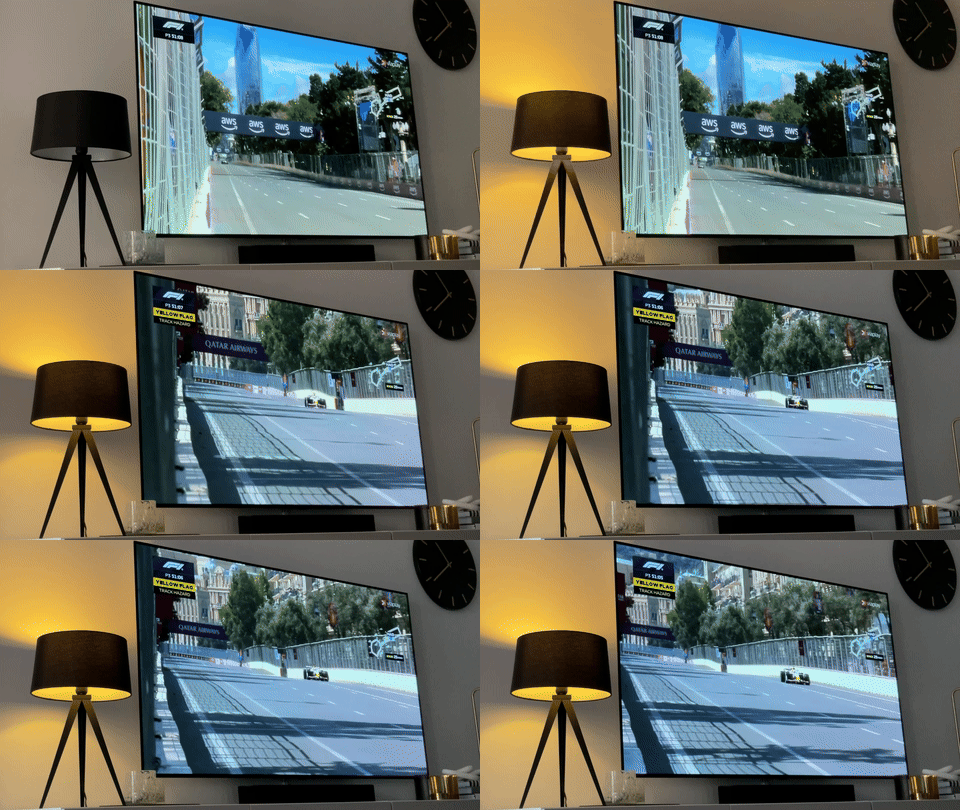
Make it yours
Where do you want to start?
A simple setup first.
More possibilities when you need them.
Get started
Install the integration and make your first dashboard.
Build your card
Choose a preset or combine modules for the view you need.
Watch in sync
Match live updates or a replay to your broadcast.
Automate your home
Bring flags, session starts and notifications into your home.
Find an answer
Understand missing data, settings and common problems.
Most users should choose the stable release. Compare release channels before trying a beta or development build.
Before. During. After.
Follow the whole weekend.
Useful between races.
Ready when the lights go out.
Know what’s next.
Bring the race calendar, session times, standings and circuit weather into a dashboard you can check at a glance.
Explore schedules and standingsKeep up with the action.
Follow timing, tyres, track status and Race Control. Use Live Delay to match your TV pictures and keep reactions in sync.
Sync with your broadcastWatch on your time.
Use No Spoiler Mode to hold back supported updates, then follow a completed session with Replay when archive data is available.
Explore Replay ModeMore than a screen
Let your home join in.
Turn track flags into lighting, get session notifications, or build your own ideas with Home Assistant entities, events and device triggers.
Explore automationsUnderstand your data
The right mode for your moment.
Public live timing
Start hereCore live timing, weather, Race Control, tyres and confirmed incident alerts work without F1TV Auth during supported sessions.
See live entities →Optional F1TV Auth
Extra live featuresAdd access for features such as live Track Map, Pit Stops, Team Radio and Championship Prediction when the source supplies the data.
Understand optional access →Replay Mode
Completed sessionsFollow historical sessions from the archive. Available timing, map and other data depend on what that session contains.
Set up a replay →Developing or testing the integration? Developer Mode uses local replay dumps for reproducible tests. It is a separate workflow from watching a TV replay.
Keep up to date
What’s new?
Find release notes, update instructions and the difference between stable, beta and development builds.
Versions and release channels →Built for the community
Enjoying your setup?
Share your ideas, ask a question or help support the project’s continued development.
F1 Sensor is an unofficial project and is not associated with the Formula 1 companies. F1, FORMULA ONE, FORMULA 1, FIA FORMULA ONE WORLD CHAMPIONSHIP, GRAND PRIX and related marks are trade marks of Formula One Licensing B.V.