F1 Sensor Live Data Cards
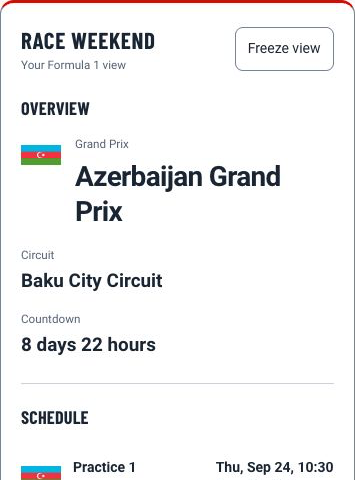
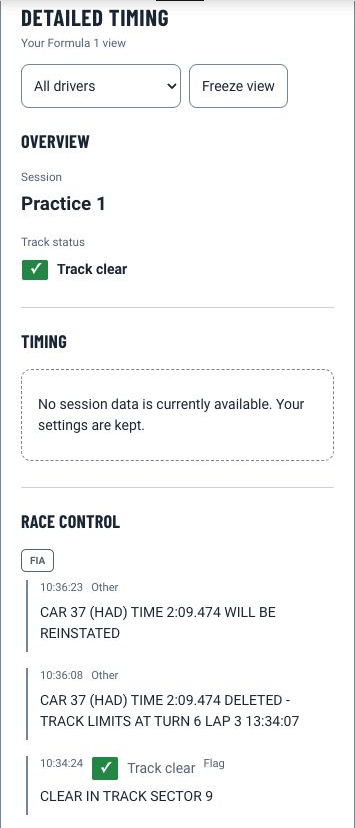
A collection of custom Lovelace cards built specifically for the F1 Sensor integration. The cards are designed to display live session data with an F1-styled dark interface and are kept up to date alongside the integration.
The cards are maintained in a dedicated repository: github.com/Nicxe/f1-sensor-live-data-card
They require the F1 Sensor integration with live data enabled to function.

Available Cards
| Card | What it shows |
|---|---|
| F1 Live Session | Session status, track condition, weather, and lap counter |
| F1 Race Control | Latest race control messages and flags |
| F1 Tyre Statistics | Tyre compounds, stint history, and best lap times per driver |
| F1 Pit Stop Overview | Pit stop timeline with tyre changes and pit times |
| F1 Driver Lap Times | Live lap times and driver positions |
| F1 Investigations | Steward investigations and penalties |
| F1 Track Limits | Track limit violations per driver |
| F1 Championship Prediction — Drivers | Driver championship standings with predicted points |
| F1 Championship Prediction — Teams | Constructor championship standings with predicted points |
Installation
Recommended — via HACS
If the button above does not work, add the repository manually:
- Open HACS in Home Assistant
- Click the three dots in the top right corner and select Custom repositories
- Enter the repository URL:
https://github.com/Nicxe/f1-sensor-live-data-card - Set the type to Dashboard
- Click Add, then search for F1 Sensor Live Data Card and click Download
When installed through HACS, you will automatically receive update notifications when new card versions are released.
Manual installation
- Download
f1-sensor-live-data-card.jsfrom the latest release - Copy the file to your
config/www/f1-sensor-live-data-card/directory (create the folder if it does not exist) - Register the resource in Home Assistant using one of the two methods below
Option A — via the UI (requires Advanced Mode to be enabled in your profile)
Go to Settings > Dashboards, open the three-dot menu in the top right, select Resources, then Add Resource. Set the URL to /local/f1-sensor-live-data-card/f1-sensor-live-data-card.js and the type to JavaScript Module.
Option B — via YAML
Add the following to your configuration.yaml:
lovelace:
resources:
- url: /local/f1-sensor-live-data-card/f1-sensor-live-data-card.js
type: module
Adding Cards to Your Dashboard
Once installed, all cards are available in the dashboard card picker:
- Open your dashboard and click Edit Dashboard
- Click the Add card button
- Search for F1 to find all available cards
- Select a card and use the visual editor to configure it
Each card has a built-in visual editor with two tabs: Data Sources for selecting entities, and Display Options for toggling which columns and fields are shown.
Card Reference
F1 Live Session Card
custom:f1-live-session-card
Displays an at-a-glance overview of the current session: session name and status, current track condition with flag color, live weather at the circuit, and a lap progress bar during the race.

Required entities: sensor.f1_session_current_session, sensor.f1_session_session_status, binary_sensor.f1_session_formation_start, sensor.f1_session_race_lap_count, sensor.f1_session_track_status, sensor.f1_session_track_weather, sensor.f1_race_next_race
| Option | Default | Description |
|---|---|---|
show_flag | true | Show the track status flag indicator |
show_lap_progress | true | Show the lap progress bar |
show_track_status | true | Show the current track status label |
show_weather | true | Show weather conditions |
F1 Race Control Card
custom:f1-race-control-card
Shows the latest race control message with flag type and category. Automatically updates as new messages arrive. Useful as a compact always-visible panel during a session.

Required entity: sensor.f1_officials_race_control
| Option | Default | Description |
|---|---|---|
show_fia_logo | true | Show the FIA logo in the card header |
min_display_time | 0 | Minimum time in milliseconds to display a message before updating |
F1 Tyre Statistics Card
custom:f1-sensor-live-data-card
Displays the current tyre compound for each driver along with stint history and the best lap times per compound. Includes visual tyre icons with compound colors.

Required entities: sensor.f1_drivers_tyre_statistics, sensor.f1_drivers_driver_list
| Option | Default | Description |
|---|---|---|
title | Tyres Statistics | Card title |
show_best_times | true | Show best lap times per compound |
show_stats | true | Show compound usage statistics |
show_delta | true | Show delta values |
show_tyre_image | true | Show tyre compound images |
show_compound_name | true | Show compound name next to the image |
show_team_logo | false | Show team logo |
max_best_times | 3 | Maximum number of best times to display |
F1 Pit Stop Overview Card
custom:f1-pitstop-overview-card
Shows a full pit stop history for all drivers: stop number, tyre fitted, pit time, pit lane time, and a delta to the fastest pit stop of the session. Rows can be filtered to only show drivers who have stopped.

Required entities: sensor.f1_drivers_pit_stops, sensor.f1_drivers_current_tyres, sensor.f1_drivers_driver_positions, sensor.f1_drivers_driver_list
| Option | Default | Description |
|---|---|---|
title | Pit Stops & Tyres | Card title |
show_tla | true | Show driver three-letter code |
show_team_logo | false | Show team logo |
show_status | true | Show pit stop status |
show_tyre | true | Show fitted tyre compound |
show_tyre_laps | false | Show laps completed on current tyre |
show_pit_count | true | Show number of stops |
show_pit_time | true | Show pit stop duration |
show_pit_lane_time | true | Show total pit lane time |
show_pit_delta | true | Show delta to fastest stop |
F1 Driver Lap Times Card
custom:f1-driver-lap-times-card
Displays the current race order with each driver's last lap time, current status, and team color coding. Retired and stopped drivers are clearly indicated.

Required entities: sensor.f1_drivers_driver_positions, sensor.f1_drivers_driver_list
| Option | Default | Description |
|---|---|---|
title | Driver Lap Times | Card title |
show_position | true | Show current race position |
show_team_logo | true | Show team logo |
show_tla | true | Show driver three-letter code |
show_status | true | Show driver status (on track, pit, retired) |
show_last_lap | true | Show last lap time |
F1 Investigations Card
custom:f1-investigations-card
Lists all steward investigations and their outcomes for the current session. Shows which driver was investigated, the incident type, and the current status. Can be configured to show all drivers or only those with active investigations.

Required entities: sensor.f1_officials_investigations_penalties, sensor.f1_drivers_driver_list, sensor.f1_drivers_driver_positions
| Option | Default | Description |
|---|---|---|
title | Investigations & Penalties | Card title |
show_team_logo | false | Show team logo |
show_all_drivers | false | Show all drivers, not only those under investigation |
F1 Track Limits Card
custom:f1-track-limits-card
Shows how many track limit violations each driver has accumulated during the session, broken down by warnings, deletions, and penalties. Can display all drivers or only those with at least one violation.

Required entities: sensor.f1_officials_track_limits, sensor.f1_drivers_driver_list, sensor.f1_drivers_driver_positions
| Option | Default | Description |
|---|---|---|
title | Track Limits | Card title |
show_team_logo | false | Show team logo |
show_all_drivers | false | Show all drivers, not only those with violations |
F1 Championship Prediction — Drivers Card
custom:f1-championship-prediction-drivers-card
Displays the driver championship standings with predicted final points alongside current points, including a delta column showing the projected gain or loss.

Required entities: sensor.f1_championship_championship_prediction_drivers, sensor.f1_drivers_driver_list
| Option | Default | Description |
|---|---|---|
title | Championship Prediction Drivers | Card title |
show_position | true | Show championship position |
show_tla | true | Show driver three-letter code |
show_team_logo | true | Show team logo |
show_predicted_points | true | Show predicted final points |
show_current_points | true | Show current points |
show_delta | true | Show point delta |
top_limit | 0 | Limit rows to top N drivers. 0 shows all |
F1 Championship Prediction — Teams Card
custom:f1-championship-prediction-teams-card
Displays the constructor championship standings with predicted final points and a delta column. Useful for tracking how the team battle is expected to develop over the remaining rounds.

Required entity: sensor.f1_championship_championship_prediction_teams
| Option | Default | Description |
|---|---|---|
title | Championship Prediction Teams | Card title |
show_position | true | Show championship position |
show_team_name | true | Show team name |
show_team_logo | true | Show team logo |
show_predicted_points | true | Show predicted final points |
show_current_points | true | Show current points |
show_delta | true | Show point delta |
top_limit | 0 | Limit rows to top N teams. 0 shows all |
Related
- Live Data entities — the sensors the cards read from
- Live Delay — sync cards with your TV broadcast
- Blueprints — ready-made automations that pair well with the cards