Constructor Championship
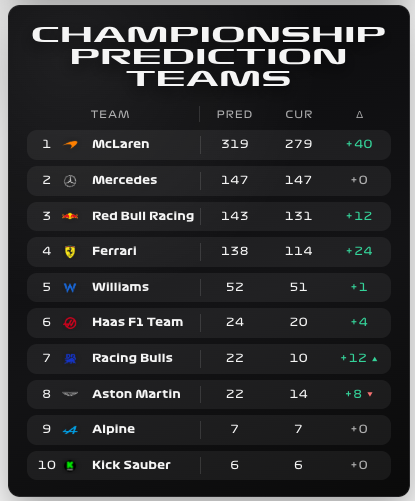
Compare published constructor points with the session’s predicted championship outcome. The table keeps current points and predicted changes side by side.
Availability
Standings / F1TV prediction. Enable Constructor Standings and Championship Prediction Teams. Current Session and Session Status add mode context. Published standings are available without F1TV Auth; live prediction can require authentication, and replay prediction depends on archive contents.
Add the card
- Open your dashboard, select Edit dashboard, then Add card.
- Search for F1 and select the Constructor Championship card.
- Select Constructor Standings as the current source and Championship Prediction Teams as the prediction source. Keep the mode badge visible and select a top-team limit if dashboard space is tight.
- Select Save.
If the card is missing from the picker, follow Card installation. With more than one F1 Sensor entry, use the sources from the same entry; see Entity selection.
Minimal YAML
Use this in a manual dashboard card. Replace any entity ID with the one in your installation if it differs.
type: custom:f1-championship-prediction-teams-card
current_entity: sensor.f1_constructor_standings
theme_mode: auto
Use the card
Treat prediction as a changing session estimate. Use Season Progression to review published points across rounds, or Results for the final Race and Sprint classifications.
Configuration
Data sources
The defaults below are the card’s fallback values. Automatic discovery connects standard sources to the selected integration entry, including renamed entity IDs. See Entity selection.
| Option | Default | Description |
|---|---|---|
current_entity | sensor.f1_constructor_standings | Current published championship standings. Select the entity from your F1 Sensor entry. |
entity | sensor.f1_championship_prediction_teams | Primary data source for this card. Select the matching entity from your F1 Sensor entry. |
session_entity | sensor.f1_current_session | Current Session for session type and context. Select the entity from your F1 Sensor entry. |
session_status_entity | sensor.f1_session_status | Session Status for active/live/replay context. Select the entity from your F1 Sensor entry. |
no_spoiler_entity | switch.f1_no_spoiler_mode | Entity whose on state enables spoiler protection. See No Spoiler Mode. |
auth_status_entity | sensor.f1_f1tv_token_status | F1TV token status entity used for enhanced-data notices. |
Display and behavior
| Option | Default | Description |
|---|---|---|
theme_mode | dark | dark, light or auto; auto follows Home Assistant. See Appearance. |
title | Constructor Championship | Card title |
show_header | true | Show the card header |
show_mode_badge | true | Show live/replay/no-spoiler mode badge |
show_table_header | true | Show column labels |
show_position | true | Show championship position |
show_team_name | true | Show team name |
show_team_logo | true | Show team logo |
team_logo_style | color | color or white for team logos. |
show_predicted_points | true | Show predicted final points |
show_current_points | true | Show current points |
show_delta | true | Show predicted points delta |
show_availability_notice | true | Show informational enhanced-data notices. Expired, invalid or rejected authentication warnings stay visible. |
top_limit | 0 | Limit rows to top N. 0 shows all. |
spoiler_placeholder | HIDE | Text used for masked values, converted to uppercase. The spoiler overlay can also cover the card. |
font_style | wide | wide, balanced or system. See Typography. |
All bundled cards also support f1_entry_id and card actions. Home Assistant layout settings remain available in the dashboard editor.
When data is missing
An empty prediction outside a session is expected. For a live availability warning, check F1TV status; for replay, confirm the archive has prediction data. No Spoiler protection deliberately hides sensitive values.
For an Entity not found message, check the selection in Data Sources and confirm that the entity is enabled in F1 Sensor. For a missing card type or an old interface after an update, use the card loading checks.