E-ink Display — F1 Pit Wall
A dedicated F1 schedule display built with ESPHome and an e-ink screen. It reads F1 Sensor entities through Home Assistant and shows the upcoming race weekend — circuit, date, session times — in a clean, always-on format that works without a running screen or dashboard.
This is a separate project maintained alongside F1 Sensor and is available as a ready-to-use ESPHome configuration.
Full source, wiring instructions, and configuration files are available at: github.com/Nicxe/esphome
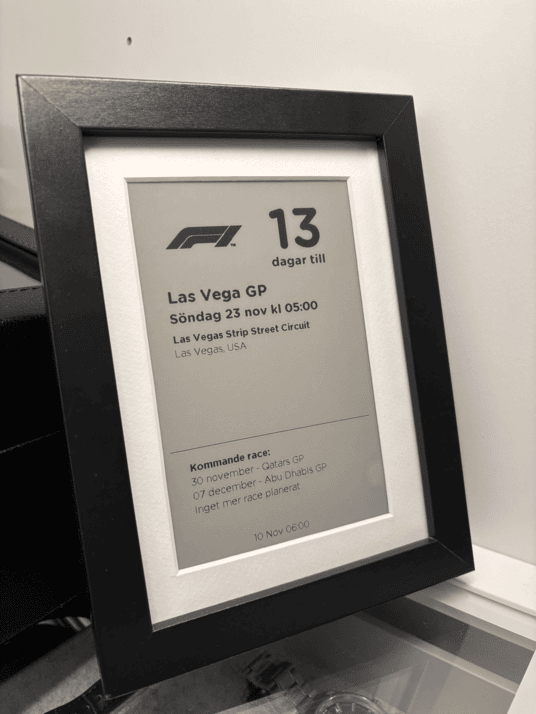
What it shows
The display is laid out as a compact race schedule overview:
- Next race — circuit name, country flag, round number, and race start time in local time
- Upcoming sessions — qualifying, practice, and sprint times for the current race weekend
- Following races — the next three rounds at a glance
All data comes from the sensor.f1_next_race and sensor.f1_current_season entities provided by F1 Sensor.
What you need
- The project’s documented hardware: a Waveshare 7.5-inch e-paper display and an ESP32 e-paper driver board. Check the project hardware and wiring before choosing parts
- ESPHome installed
- F1 Sensor integration installed and configured with the next race and season sensors enabled
- Home Assistant with the ESPHome integration
Getting started
- Open the F1 Pit Board configuration and its F1 Home Assistant package
- Follow the hardware setup and wiring guide in the repository
- Flash the ESPHome configuration to your device
- The display will connect to Home Assistant and start pulling data from F1 Sensor automatically
The display configuration includes scheduled refreshes and a refresh button. Check its current code for timing and power behavior before changing it; an e-ink panel retaining an image does not mean the controller is configured for deep sleep.
Related
- Next Race sensor — the primary data source for the display
- Season Calendar — for full session schedule data
- F1 Sensor card — for live in-session dashboards