Community cards by Boredmthfkr
Build a standings dashboard with custom:button-card, a shared image helper and your own font. This contributed recipe is by Boredmthfkr; the full YAML below preserves the author's design.
For questions about this setup, use the original Home Assistant forum discussion. Thank you to Boredmthfkr for sharing it.
This is a third-party dashboard example. Check entity IDs, current image URLs and button-card compatibility in your own setup. For the bundled card with maintained configuration guidance, start with the F1 Sensor card.
Prerequisites:
- Choose a web font that you have permission to use
- Create a template helper for the “missing” info, like teams logos and cars pictures
- Custom:button-card installed ( https://github.com/custom-cards/button-card )
Steps
Install F1 font to use
Choose a licensed .woff2 font and place it in /config/www/fonts/. The example calls it f1regular.woff2; change the file name and family name to match your font. The font is optional: you can also use a system font in the card styles.
In the same folder, I created another file, myfont.css, with the following content:
@font-face {
    font-family: 'f1regular';
    src: url('/local/fonts/f1regular.woff2') format('woff2');
    }
I went to Settings -> Dashboards -> Resources (located in the More menu of Dashboards, the 3 vertical dots) and added a new resource of type Stylesheet, pointing to (URL) /local/fonts/myfont.css
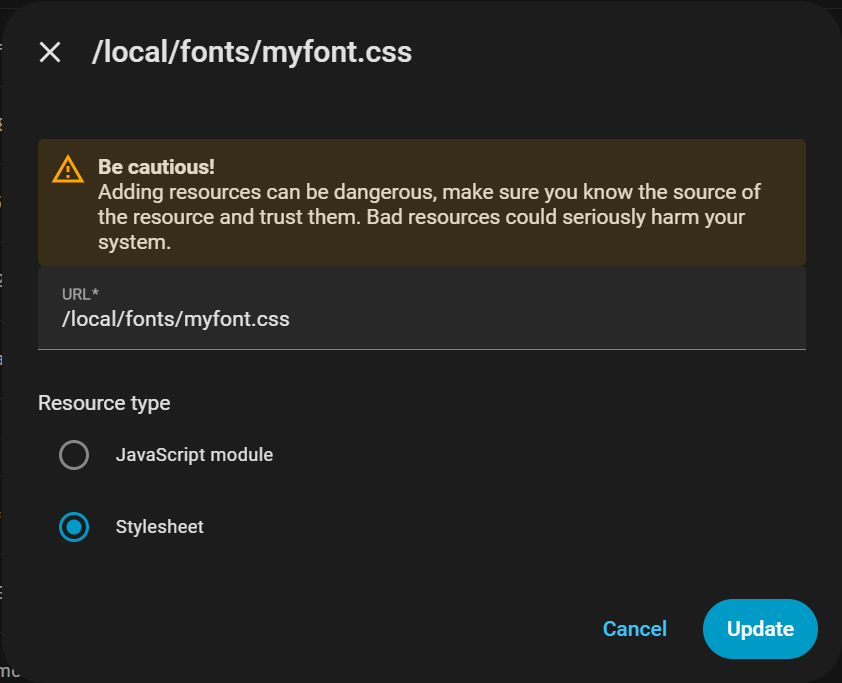
Reload your browser after adding the resource. If the old font remains, clear the browser cache for Home Assistant and reload again.
Create a template helper for the “missing” info
This helper is used by the cards to get the car pictures and teams logos, that are not provided by the integration. My latest version of the cards gets this data from here. Why? Because I want consistency and to have only one place where I have to make changes before a season. Links to images and logos are taken from the Official F1 website ( https://www.formula1.com/ ). I just went and looked for teams and copied the links to the logos and cars. I noticed for some logos that their colors kind of conflict with the teams color, so they are not displayed properly and a black and white logo is more suitable. Also, I noticed that some logos had “white” in their name, meaning you can “manipulate” the logo by adding “white” before extension .wepb and you get the logo in black and white. There might be some more colors there, but I do not need them, in order to look further. Also, while I am writing this, I also noticed that the cars pictures have “right” in their name. I tried now and if you replace “right” with “left”, you see the picture of the other side of the car. Cool, right? Use this as you please.
Examples:
Ferrari car seen from the right: https://media.formula1.com/image/upload/c_lfill,w_3392/q_auto/v1740000000/common/f1/2025/ferrari/2025ferraricarright.webp Ferrari car seen from the left: https://media.formula1.com/image/upload/c_lfill,w_3392/q_auto/v1740000000/common/f1/2025/ferrari/2025ferraricarleft.webp Original Ferrary logo: https://media.formula1.com/image/upload/c_fit,h_64/q_auto/v1740000000/common/f1/2025/ferrari/2025ferrarilogo.webp Black and white Ferrari logo: https://media.formula1.com/image/upload/c_fit,h_64/q_auto/v1740000000/common/f1/2025/ferrari/2025ferrarilogowhite.webp
For the template sensors, I define them on a separate file, I do not use configuration.yaml In my configuration.yaml I have added the following line:
template: !include templates.yaml
I have a file templates.yaml under the config folder in HA. Here, I added the following lines:
### F1 assets ###

sensor:
  - default_entity_id: sensor.f1_assets
    name: F1 Assets
    unique_id: f1_asset_lookup_table
    state: "ready"
    attributes:
      team_logos: >
        {
          "McLaren": "https://media.formula1.com/image/upload/c_fit,h_64/q_auto/v1740000000/common/f1/2026/mclaren/2026mclarenlogo.webp",
          "Mercedes": "https://media.formula1.com/image/upload/c_fit,h_64/q_auto/v1740000000/common/f1/2026/mercedes/2026mercedeslogowhite.webp",
          "Red Bull": "https://media.formula1.com/image/upload/c_fit,h_64/q_auto/v1740000000/common/f1/2026/redbullracing/2026redbullracinglogo.webp",
          "Ferrari": "https://media.formula1.com/image/upload/c_fit,h_64/q_auto/v1740000000/common/f1/2026/ferrari/2026ferrarilogo.webp",
          "Williams": "https://media.formula1.com/image/upload/c_fit,h_64/q_auto/v1740000000/common/f1/2026/williams/2026williamslogo.webp",
          "RB F1 Team": "https://media.formula1.com/image/upload/c_fit,h_64/q_auto/v1740000000/common/f1/2026/racingbulls/2026racingbullslogowhite.webp",
          "Aston Martin": "https://media.formula1.com/image/upload/c_fit,h_64/q_auto/v1740000000/common/f1/2026/astonmartin/2026astonmartinlogowhite.webp",
          "Haas F1 Team": "https://media.formula1.com/image/upload/c_fit,h_64/q_auto/v1740000000/common/f1/2026/haas/2026haaslogo.webp",
          "Audi": "https://media.formula1.com/image/upload/c_fit,h_64/q_auto/v1740000000/common/f1/2026/audi/2026audilogo.webp",
          "Alpine F1 Team": "https://media.formula1.com/image/upload/c_fit,h_64/q_auto/v1740000000/common/f1/2026/alpine/2026alpinelogo.webp",
          "Cadillac F1 Team": "https://media.formula1.com/image/upload/c_fit,h_64/q_auto/v1740000000/common/f1/2026/cadillac/2026cadillaclogo.webp"
        }
      car_images: >
        {
          "McLaren": "https://media.formula1.com/image/upload/c_lfill,w_3392/q_auto/v1740000000/common/f1/2026/mclaren/2026mclarencarright.webp",
          "Mercedes": "https://media.formula1.com/image/upload/c_lfill,w_3392/q_auto/v1740000000/common/f1/2026/mercedes/2026mercedescarright.webp",
          "Red Bull": "https://media.formula1.com/image/upload/c_lfill,w_3392/q_auto/v1740000000/common/f1/2026/redbullracing/2026redbullracingcarright.webp",
          "Ferrari": "https://media.formula1.com/image/upload/c_lfill,w_3392/q_auto/v1740000000/common/f1/2026/ferrari/2026ferraricarright.webp",
          "Williams": "https://media.formula1.com/image/upload/c_lfill,w_3392/q_auto/v1740000000/common/f1/2026/williams/2026williamscarright.webp",
          "RB F1 Team": "https://media.formula1.com/image/upload/c_lfill,w_3392/q_auto/v1740000000/common/f1/2026/racingbulls/2026racingbullscarright.webp",
          "Aston Martin": "https://media.formula1.com/image/upload/c_lfill,w_3392/q_auto/v1740000000/common/f1/2026/astonmartin/2026astonmartincarright.webp",
          "Haas F1 Team": "https://media.formula1.com/image/upload/c_lfill,w_3392/q_auto/v1740000000/common/f1/2026/haas/2026haascarright.webp",
          "Audi": "https://media.formula1.com/image/upload/c_lfill,w_3392/q_auto/v1740000000/common/f1/2026/audi/2026audicarright.webp",
          "Alpine F1 Team": "https://media.formula1.com/image/upload/c_lfill,w_3392/q_auto/v1740000000/common/f1/2026/alpine/2026alpinecarright.webp",
          "Cadillac F1 Team": "https://media.formula1.com/image/upload/c_lfill,w_3392/q_auto/v1740000000/common/f1/2026/cadillac/2026cadillaccarright.webp"
        }
After merging the template configuration, check the configuration and reload template entities. Confirm that sensor.f1_assets exists before adding the cards. If your setup requires a restart for the new include, restart Home Assistant after the configuration check.
The cards
Adjustments can be done as you like. I got to this version of the cards that I like and that is also responsive to mobile/tablet. If there is a team color missing in the sensors, it falls back to grey and for drivers, if the headshot link is not present in the sensor.f1_driver_list, also falls back to the icon mdi:racing-helmet Font can be adjusted to your own liking. Just replace all f1regular with the name you used in the css file for the fonts, under font-family. Here are the codes.
Drivers Standings card
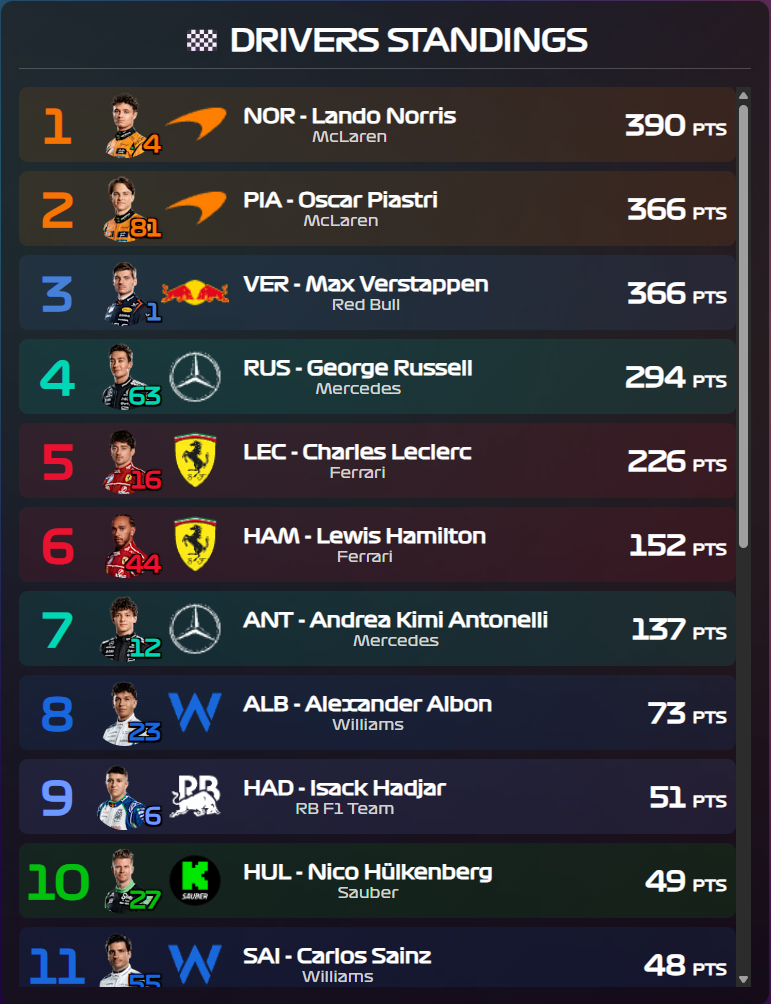
Show asset helper YAML
type: custom:button-card
entity: sensor.f1_driver_standings
show_name: false
show_state: false
show_icon: false
layout: custom
styles:
  grid:
    - grid-template-areas: |
        "header"
        "results"
    - row-gap: 12px
  card:
    - padding: 12px
    - border-radius: 8px
    - background: linear-gradient(135deg, rgba(30, 30, 30, 0.8), rgba(10, 10, 10, 0.8))
    - color: white
    - box-shadow: 0px 4px 10px rgba(0,0,0,0.3)
  custom_fields:
    header:
      - font-size: 20px
      - font-weight: 600
      - text-align: center
      - padding-bottom: 6px
      - border-bottom: 1px solid rgba(255,255,255,0.2)
      - cursor: default
      - font-family: f1regular
    results:
      - font-size: 14px
      - line-height: 1.6
      - display: flex
      - flex-direction: column
      - gap: 6px
      - font-family: f1regular
      - overflow-y: auto
      - max-height: 600px
custom_fields:
  header: |
    [[[
      return `
        <div style="width: 100%; text-align: center;">
          <div style="display: inline-flex; align-items: center; gap: 8px;">
            <span style="font-weight: 600; font-family: 'f1regular';">🏁 DRIVERS STANDINGS</span>
          </div>
        </div>
      `;
    ]]]
  results: |
    [[[
      const results = entity.attributes?.driver_standings || [];
      const displayResults = results.slice(0, 25);

      // Build team color map from driver list
      const getTeamColors = () => {
        const driverList = states['sensor.f1_driver_list']?.attributes?.drivers || [];
        const colorMap = {};
        driverList.forEach(d => {
          if (d.team && d.team_color) {
            colorMap[d.team] = d.team_color;
          }
        });
        return colorMap;
      };

      const getDriverData = () => {
        const driverList = states['sensor.f1_driver_list']?.attributes?.drivers || [];
        const dataMap = {};
        driverList.forEach(d => {
          if (d.tla) {
            dataMap[d.tla] = {
              color: d.team_color,
              headshot: d.headshot_small,
              racing_number: d.racing_number,
              team: d.team
            };
          }
        });
        return dataMap;
      };

      // Get team logos from sensor.f1_assets
      const getTeamLogos = () => {
        console.log('=== F1 ASSETS DEBUG ===');

        // List all f1-related sensors to help debug
        const allF1Sensors = Object.keys(states).filter(e => e.includes('f1'));
        console.log('All F1 sensors found:', allF1Sensors.join(', '));

        const assetsEntity = states['sensor.f1_assets'];
        console.log('Entity exists:', !!assetsEntity);

        if (assetsEntity && assetsEntity.attributes && assetsEntity.attributes.team_logos) {
          const rawData = assetsEntity.attributes.team_logos;
          const dataType = typeof rawData;

          console.log('Data type:', dataType);
          console.log('Raw data:', JSON.stringify(rawData).substring(0, 200) + '...');

          try {
            // Check if it's already an object
            if (dataType === 'object') {
              console.log('✓ team_logos is already an object - using directly');
              console.log('Teams found:', Object.keys(rawData).join(', '));
              return rawData;
            }
            // Otherwise parse as JSON
            const parsed = JSON.parse(rawData);
            console.log('✓ Parsed successfully');
            console.log('Teams found:', Object.keys(parsed).join(', '));
            return parsed;
          } catch (e) {
            console.error('✗ Error parsing team_logos:', e.message);
            return {};
          }
        }
        console.log('✗ sensor.f1_assets not found or missing team_logos');
        return {};
      };

      const teamColors = getTeamColors();
      const teamLogos = getTeamLogos();
      const driverData = getDriverData();
      const FALLBACK_COLOR = '#888';
      const FALLBACK_ICON = 'mdi:racing-helmet';

      const FONT_STYLE = "font-family: 'f1regular';";

      // Detect mobile screen
      const isMobile = window.innerWidth <= 768;

      // Responsive sizing
      const IMG_SIZE = isMobile ? '35px' : '45px';
      const ICON_SIZE = isMobile ? '35px' : '45px';
      const POS_FONT = isMobile ? '24px' : '30px';
      const NAME_FONT = isMobile ? '11px' : '13px';
      const TEAM_FONT = isMobile ? '9px' : '10px';
      const PTS_FONT = isMobile ? '14px' : '18px';
      const PTS_LABEL_FONT = isMobile ? '8px' : '10px';
      const GAP = isMobile ? '4px' : '8px';
      const PADDING = isMobile ? '1px 4px' : '1px 6px';
      const POS_WIDTH = isMobile ? '30px' : '40px';
      const BADGE_FONT = isMobile ? '12px' : '15px';

      return displayResults.map((r, idx) => {
        const pos = r.position !== undefined ? r.position : (r.positionText || '-');

        const code = r.Driver?.code;
        const name = `${r.Driver?.givenName || ''} ${r.Driver?.familyName || ''}`.trim();
        const team = r.Constructors?.[0]?.name || '';
        const points = r.points || '0';

        const driverSpecificData = driverData[code] || {};
        const color = driverSpecificData.color || teamColors[team] || FALLBACK_COLOR;
        const teamLogoUrl = teamLogos[team] || '';
        const headshotUrl = driverSpecificData.headshot;
        const racingNumber = driverSpecificData.racing_number || '';

        const bgColor = color.length === 7 ? color + '1A' : color;
        const posTextColor = color === FALLBACK_COLOR ? 'white' : color;

        let headshotTag;
        if (headshotUrl) {
          headshotTag = `
            <div style="position: relative; width: ${IMG_SIZE}; height: ${IMG_SIZE};">
              <img src="${headshotUrl}" style="width: 100%; height: 100%; border-radius: 50%; object-fit: cover;">
              ${racingNumber ? `
                <div style="
                  position: absolute;
                  bottom: -2px;
                  right: -2px;
                  color: ${color};
                  font-size: ${BADGE_FONT};
                  font-weight: 900;
                  text-shadow:
                    -1px -1px 0 #000,
                    1px -1px 0 #000,
                    -1px 1px 0 #000,
                    1px 1px 0 #000,
                    0 0 3px rgba(0,0,0,0.8);
                ">${racingNumber}</div>
              ` : ''}
            </div>
          `;
        } else {
          headshotTag = `
            <div style="
              display: flex;
              align-items: center;
              justify-content: center;
              width: ${IMG_SIZE};
              height: ${IMG_SIZE};
              border-radius: 50%;
              background: rgba(255, 255, 255, 0);
              line-height: 1;
            ">
              <ha-icon icon="${FALLBACK_ICON}" style="--mdc-icon-size: ${ICON_SIZE}; color: ${posTextColor};"></ha-icon>
            </div>
          `;
        }

        const logoTag = teamLogoUrl
            ? `<img src="${teamLogoUrl}" style="width: ${IMG_SIZE}; height: auto; max-height: ${ICON_SIZE};">`
            : '';

        return `
          <div style="
            display: grid;
            grid-template-columns: ${POS_WIDTH} 1fr auto;
            column-gap: 2px;
            align-items: center;
            background: ${bgColor};
            padding: ${PADDING};
            border-radius: 6px;
            ${FONT_STYLE}
          ">

            <div style="
              font-size: ${POS_FONT};
              font-weight: 900;
              color: ${posTextColor};
              text-align: center;
              ${FONT_STYLE}
            ">
              ${pos}
            </div>

            <div style="display: flex; align-items: center; gap: ${GAP};">

              <div style="
                display: flex;
                align-items: center;
                height: 30px;
                gap: 2px;
                padding-right: 2px;
              ">
                ${headshotTag}
                ${logoTag}
              </div>

              <div style="display: flex; flex-direction: column; line-height: 1.2;">
                <div style="color: var(--primary-text-color); font-weight: 600; font-size: ${NAME_FONT};">${code} - ${name}</div>
                <div style="font-size: ${TEAM_FONT}; color: rgba(255, 255, 255, 0.8);">${team}</div>
              </div>

            </div>

            <div style="
              font-size: ${PTS_FONT};
              font-weight: 900;
              color: var(--primary-text-color);
              text-align: right;
              ${FONT_STYLE}
            ">
              ${points} <span style="font-size: ${PTS_LABEL_FONT}; font-weight: 600;">PTS</span>
            </div>

          </div>
        `;
      }).join('');
    ]]]
Constructors Standings card
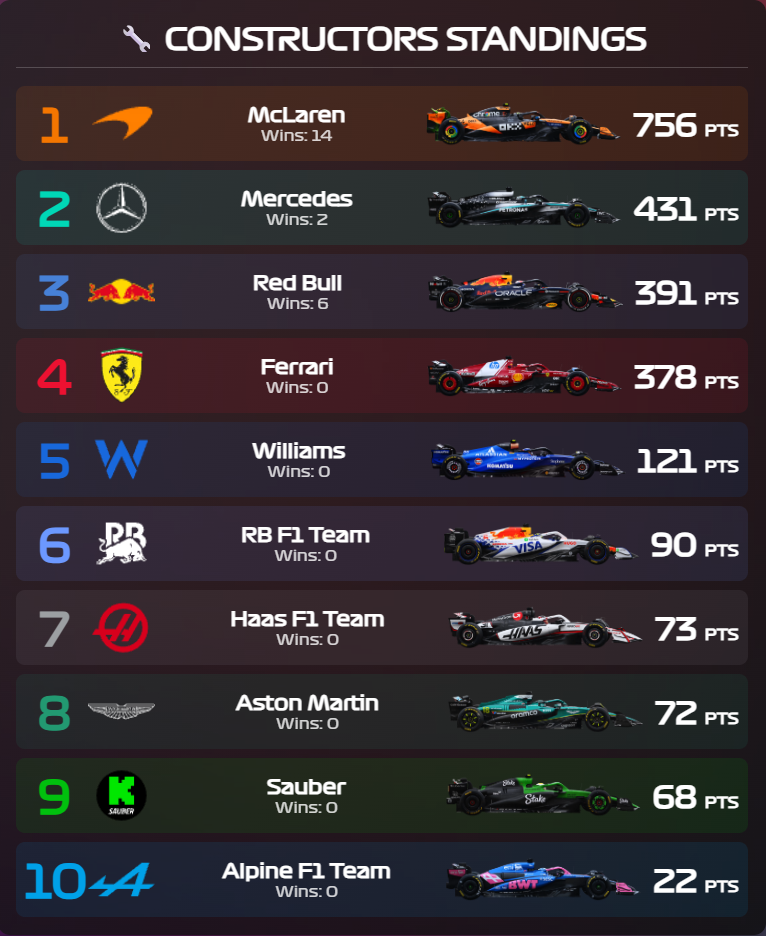
Show card YAML
type: custom:button-card
entity: sensor.f1_constructor_standings
show_name: false
show_state: false
show_icon: false
layout: custom
styles:
  grid:
    - grid-template-areas: |
        "header"
        "results"
    - row-gap: 12px
  card:
    - padding: 12px
    - border-radius: 8px
    - background: linear-gradient(135deg, rgba(30, 30, 30, 0.8), rgba(10, 10, 10, 0.8))
    - color: white
    - box-shadow: 0px 4px 10px rgba(0,0,0,0.3)
  custom_fields:
    header:
      - font-size: 20px
      - font-weight: 600
      - text-align: center
      - padding-bottom: 6px
      - border-bottom: 1px solid rgba(255,255,255,0.2)
      - cursor: default
      - font-family: f1regular
    results:
      - font-size: 14px
      - line-height: 1.6
      - display: flex
      - flex-direction: column
      - gap: 6px
      - font-family: f1regular
      - overflow-y: auto
      - max-height: 600px
custom_fields:
  header: |
    [[[
      return `
        <div style="width: 100%; text-align: center;">
          <div style="display: inline-flex; align-items: center; gap: 8px;">
            <span style="font-weight: 600; font-family: 'f1regular';">🔧 CONSTRUCTORS STANDINGS</span>
          </div>
        </div>
      `;
    ]]]
  results: |
    [[[
      const results = entity.attributes?.constructor_standings || [];
      const displayResults = results.slice(0, 25);

      const FALLBACK_COLOR = '#888';
      const FONT_STYLE = "font-family: 'f1regular';";

      // Build team color map from driver list
      const getTeamColors = () => {
        const driverList = states['sensor.f1_driver_list']?.attributes?.drivers || [];
        const colorMap = {};
        driverList.forEach(d => {
          if (d.team && d.team_color) {
            colorMap[d.team] = d.team_color;
          }
        });
        console.log('Team colors loaded:', Object.keys(colorMap).length);
        console.log('Available teams:', Object.keys(colorMap).join(', '));
        return colorMap;
      };

      // Map API team names to driver list team names
      const normalizeTeamName = (apiTeamName) => {
        const mappings = {
          "Red Bull": "Red Bull Racing",
          "Sauber": "Kick Sauber",
          "RB F1 Team": "Racing Bulls",
          "Alpine F1 Team": "Alpine"
        };
        return mappings[apiTeamName] || apiTeamName;
      };

      // Get assets from sensor.f1_assets
      const getAssets = () => {
        console.log('=== F1 CONSTRUCTOR ASSETS DEBUG ===');

        const assetsEntity = states['sensor.f1_assets'];
        console.log('Entity exists:', !!assetsEntity);

        if (!assetsEntity || !assetsEntity.attributes) {
          console.log('✗ sensor.f1_assets not found');
          return { teamLogos: {}, carImages: {} };
        }

        const result = { teamLogos: {}, carImages: {} };

        // Get team logos
        if (assetsEntity.attributes.team_logos) {
          const rawLogos = assetsEntity.attributes.team_logos;
          try {
            result.teamLogos = typeof rawLogos === 'object' ? rawLogos : JSON.parse(rawLogos);
            console.log('✓ Team logos loaded:', Object.keys(result.teamLogos).length);
          } catch (e) {
            console.error('✗ Error parsing team_logos:', e.message);
          }
        }

        // Get car images
        if (assetsEntity.attributes.car_images) {
          const rawCars = assetsEntity.attributes.car_images;
          try {
            result.carImages = typeof rawCars === 'object' ? rawCars : JSON.parse(rawCars);
            console.log('✓ Car images loaded:', Object.keys(result.carImages).length);
          } catch (e) {
            console.error('✗ Error parsing car_images:', e.message);
          }
        }

        console.log('======================================');
        return result;
      };

      const { teamLogos, carImages } = getAssets();
      const teamColors = getTeamColors();

      // Detect mobile screen
      const isMobile = window.innerWidth <= 768;

      // Responsive sizing
      const LOGO_SIZE = isMobile ? '35px' : '45px';
      const CAR_IMG_WIDTH = isMobile ? '80px' : '130px';
      const POS_FONT = isMobile ? '24px' : '30px';
      const NAME_FONT = isMobile ? '11px' : '13px';
      const WINS_FONT = isMobile ? '9px' : '10px';
      const PTS_FONT = isMobile ? '16px' : '20px';
      const PTS_LABEL_FONT = isMobile ? '8px' : '10px';
      const GAP = isMobile ? '4px' : '8px';
      const PADDING = isMobile ? '1px 4px' : '1px 6px';
      const POS_WIDTH = isMobile ? '30px' : '40px';

      return displayResults.map((r) => {
        const pos = r.position !== undefined ? r.position : (r.positionText || '-');

        const apiTeamName = r.Constructor?.name || 'Unknown';
        const normalizedName = normalizeTeamName(apiTeamName);
        const points = r.points || '0';

        // Use normalized name for colors, API name for assets
        const color = teamColors[normalizedName] || FALLBACK_COLOR;
        const carImageUrl = carImages[apiTeamName] || '';
        const teamLogoUrl = teamLogos[apiTeamName] || '';

        const bgColor = color.length === 7 ? color + '1A' : color;
        const posTextColor = color === FALLBACK_COLOR ? 'white' : color;

        const carImageTag = carImageUrl
            ? `<img src="${carImageUrl}" style="width: ${CAR_IMG_WIDTH}; height: auto; max-height: ${LOGO_SIZE}; object-fit: cover;">`
            : '';

        const logoTag = teamLogoUrl
            ? `<img src="${teamLogoUrl}" style="width: ${LOGO_SIZE}; height: auto; max-height: ${LOGO_SIZE};">`
            : '';

        return `
          <div style="
            display: grid;
            grid-template-columns: ${POS_WIDTH} 1fr auto;
            column-gap: 2px;
            align-items: center;
            background: ${bgColor};
            padding: ${PADDING};
            border-radius: 6px;
            ${FONT_STYLE}
          ">

            <div style="
              font-size: ${POS_FONT};
              font-weight: 900;
              color: ${posTextColor};
              text-align: center;
              ${FONT_STYLE}
            ">
              ${pos}
            </div>

            <div style="display: flex; align-items: center; gap: ${GAP};">

              <div style="
                display: flex;
                align-items: center;
                height: 30px;
                gap: 2px;
                padding-right: 2px;
              ">
                ${logoTag}
              </div>

              <div style="
                display: flex;
                flex-direction: column;
                line-height: 1.2;
                align-items: center;
                flex-grow: 1;
              ">
                <div style="color: var(--primary-text-color); font-weight: 600; font-size: ${NAME_FONT};">${apiTeamName}</div>
                <div style="font-size: ${WINS_FONT}; color: rgba(255, 255, 255, 0.8);">Wins: ${r.wins}</div>
              </div>

            </div>

            <div style="
              display: flex;
              align-items: center;
              justify-content: flex-end;
              gap: ${GAP};
              font-size: ${PTS_FONT};
              font-weight: 900;
              color: var(--primary-text-color);
              ${FONT_STYLE}
            ">

              ${carImageTag}

              <div>
                ${points} <span style="font-size: ${PTS_LABEL_FONT}; font-weight: 600;">PTS</span>
              </div>
            </div>

          </div>
        `;
      }).join('');
    ]]]
Enjoy!